Switch Exhaustiveness
How many times have you added a new option (enum, union, expression, ...) without updating all code paths? Did this result in unforeseen issues?
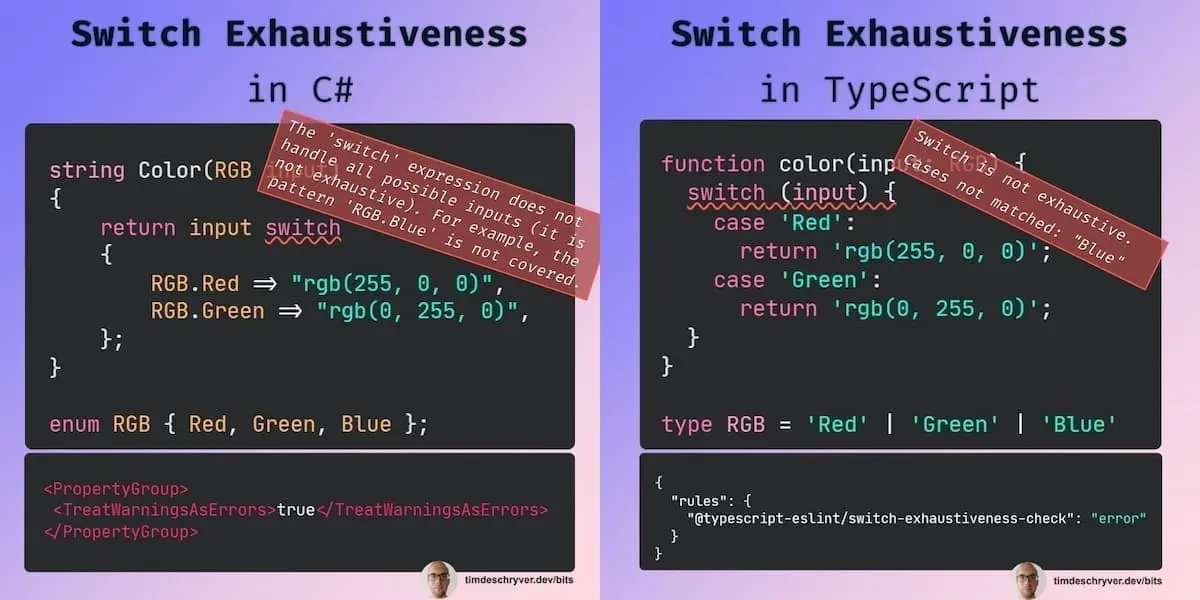
How many times have you added a new option (enum, union, expression, ...) without updating all code paths? Did this result in unforeseen issues?
One of the reasons why I prefer switch statements over if-else conditions is that it supports exhaustiveness checks. This is incredibly useful because it ensures that no scenario is left unhandled, reducing the risk of unexpected bugs or runtime errors. It also shortens the feedback loop because your IDE immediately flags incomplete switch statements.
Personally, I also find a switch statement more readable in contrast to an if-else condition.
The Switch Exhaustiveness check is not enabled by default, so you'll have to enable it.
In C# applications the default behavior is that a non-exhaustive switch is a warning.
To turn this into an error, configure the TreatWarningsAsErrors compiler option in your project(s).
If you just want to treat specific warnings as an error, use the WarningAsErrors compiler option instead, which accepts warning numbers, e.g. <WarningsAsErrors>CS8509</WarningsAsErrors>.
Now, when a switch is not exhaustive, it results in a compilation error.
ExampleProject.csproj
Example.cs
Output
For TypeScript applications, enable the switch-exhaustiveness-check ESLint rule.
It's best to configure this rule as an error so it catches your attention.
Enabling the ESLint rule doesn't prevent the application from building. As an alternative, manually add a default case that turns into a compiler error when it detects a non-exhaustive switch. For this, you can use the never type. Now this will also result in a compiler error.
.eslintrc.
example.ts
Output
example.ts
Feel free to update this developer bit on GitHub, thanks in advance!